


Lang thang trên mạng tình cờ thấy có bác chia sẻ nút liên hệ đẹp cho wordpress khá đẹp nên copy về chia sẻ lại cho anh em nào cần ^^
Hướng dẫn này dành cho theme flatsome, các theme khác tuỳ vào cấu trúc cũng làm tương tự.
Demo cái ảnh:
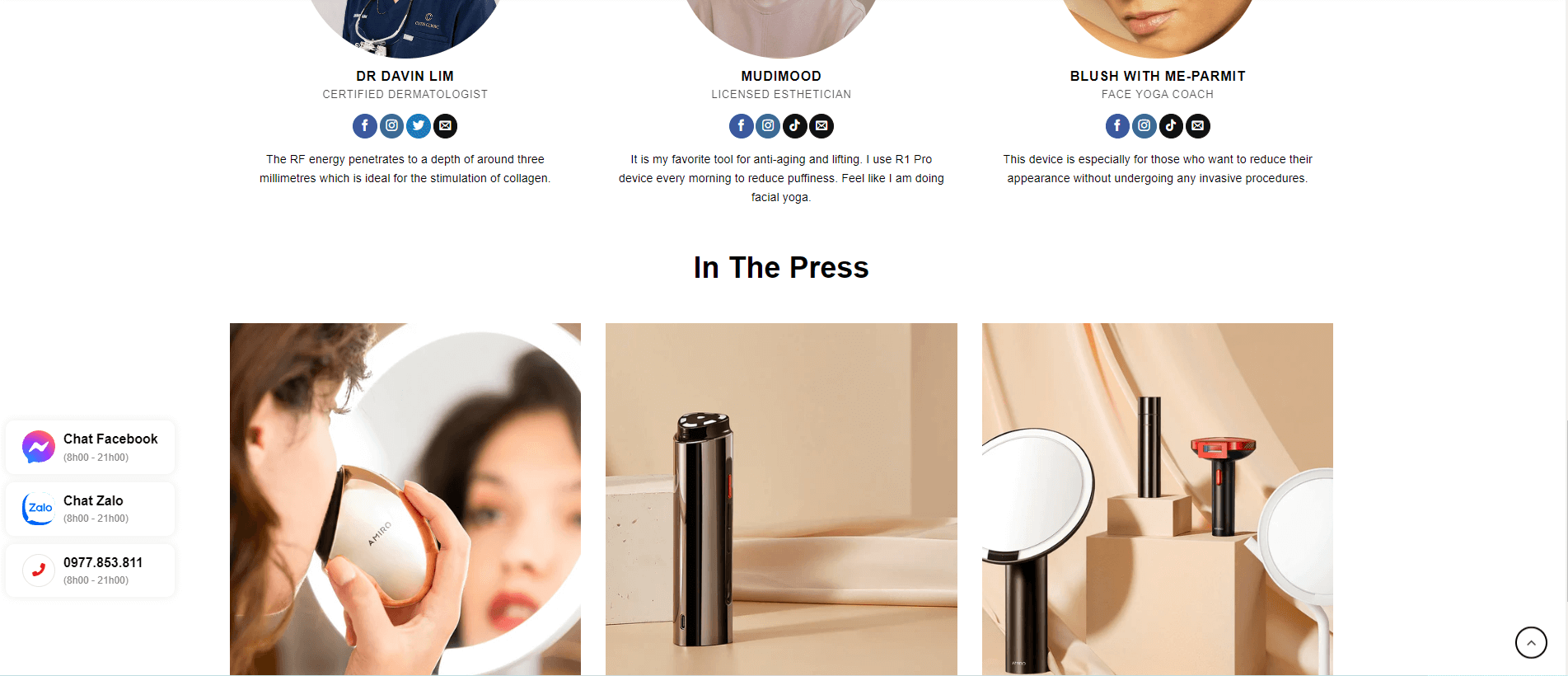
Copy CSS sao đó vào Flatsome – Advanced – Custom CSS và dán vào All Screens và lưu lại:
1 2 3 4 5 6 7 8 9 10 11 12 13 14 15 16 17 18 19 20 21 22 23 24 25 26 27 28 29 30 31 32 33 34 35 36 37 38 39 40 41 42 43 44 45 46 47 48 49 50 51 52 53 54 55 56 57 58 59 60 61 62 63 64 65 66 67 68 69 70 71 72 73 74 75 76 77 78 79 80 81 82 83 84 85 86 87 | /* CSS nút liên hệ bên phải */ .contact-box-bottom { position: fixed; bottom: 55px; left: 10px; z-index: 10000; -webkit-animation-duration: 1s; animation-duration: 1s; -webkit-animation-duration: 1s; animation-duration: 1s; -webkit-animation-fill-mode: both; animation-fill-mode: both; -webkit-transform: translateX(2000px) scale(.7); transform: translateX(2000px) scale(.7); } @-webkit-keyframes backInRight { 0% { opacity: .7; -webkit-transform: translateX(2000px) scale(.7); transform: translateX(2000px) scale(.7); } 80% { opacity: .7; -webkit-transform: translateX(0) scale(.7); transform: translateX(0) scale(.7); } to { opacity: 1; -webkit-transform: scale(1); transform: scale(1); } } @keyframes backInRight { 0% { opacity: .7; -webkit-transform: translateX(2000px) scale(.7); transform: translateX(2000px) scale(.7); } 80% { opacity: .7; -webkit-transform: translateX(0) scale(.7); transform: translateX(0) scale(.7); } to { opacity: 1; -webkit-transform: scale(1); transform: scale(1); } } .animate__backInRight { -webkit-animation-name: backInRight; animation-name: backInRight; } .contact-box-wrapper { display: flex; align-items: center; background: linear-gradient(to right, #ffffff, #f3f3f3); margin-bottom: 10px; padding: 5px 20px; border-radius: 10px; box-shadow: 2px 2px 3px 0px #0d2a6136; } .contact-icon-box { display: block; text-align: center; width: 35px; height: 35px; font-size: 16px; line-height: 36px; border: 1px solid #e5e5e5; border-radius: 999px; } .contact-info { font-size: 12px; padding-left: 10px; display: grid; } .contact-info span { color: #363636; font-size: 12px; } |
Copy CDN Font Awesome sau đó vào Flatsome – Advanced – Global Settings và dán vào Header Scripts và lưu lại:
1 | <link rel="stylesheet" href="https://huanvm.com/wp-content/litespeed/localres/aHR0cHM6Ly9jZG5qcy5jbG91ZGZsYXJlLmNvbS8=ajax/libs/font-awesome/6.4.0/css/all.min.css" integrity="sha512-iecdLmaskl7CVkqkXNQ/ZH/XLlvWZOJyj7Yy7tcenmpD1ypASozpmT/E0iPtmFIB46ZmdtAc9eNBvH0H/ZpiBw==" crossorigin="anonymous" referrerpolicy="no-referrer" /> |
Copy đoạn code sau và dán vào file functions.php của child-theme:
1 2 3 4 5 6 7 8 9 10 11 12 13 14 15 16 17 18 19 20 21 22 23 24 25 26 27 28 29 30 31 32 33 34 35 | // Code lien he ben trai function contact_box_left() { ?> <div class="contact-box-bottom animate__backInRight"> <a class="contact-box-wrapper nut-chat-facebook" href="https://m.me/huanvm" rel="nofollow" target="_blank"> <div class="contact-icon-box" style="border: none;"><svg xmlns="http://www.w3.org/2000/svg" viewBox="0 0 800 800"><radialGradient id="a" cx="101.9" cy="809" r="1.1" gradientTransform="matrix(800 0 0 -800 -81386 648000)" gradientUnits="userSpaceOnUse"><stop offset="0" style="stop-color:#09f"></stop><stop offset=".6" style="stop-color:#a033ff"></stop><stop offset=".9" style="stop-color:#ff5280"></stop><stop offset="1" style="stop-color:#ff7061"></stop></radialGradient><path fill="url(#a)" d="M400 0C174.7 0 0 165.1 0 388c0 116.6 47.8 217.4 125.6 287 6.5 5.8 10.5 14 10.7 22.8l2.2 71.2a32 32 0 0 0 44.9 28.3l79.4-35c6.7-3 14.3-3.5 21.4-1.6 36.5 10 75.3 15.4 115.8 15.4 225.3 0 400-165.1 400-388S625.3 0 400 0z"></path><path fill="#FFF" d="m159.8 501.5 117.5-186.4a60 60 0 0 1 86.8-16l93.5 70.1a24 24 0 0 0 28.9-.1l126.2-95.8c16.8-12.8 38.8 7.4 27.6 25.3L522.7 484.9a60 60 0 0 1-86.8 16l-93.5-70.1a24 24 0 0 0-28.9.1l-126.2 95.8c-16.8 12.8-38.8-7.3-27.5-25.2z"></path> </svg></div> <div class="contact-info"> <b>Chat Facebook</b> <span>(8h00 - 21h00)</span> </div> </a> <a class="contact-box-wrapper nut-chat-zalo" href="https://zalo.me/0977853811" rel="nofollow" target="_blank"> <div class="contact-icon-box" style="border: none;"><svg xmlns="http://www.w3.org/2000/svg" viewBox="0 0 161.5 161.5"><path d="M504.54,431.79h14.31c19.66,0,31.15,2.89,41.35,8.36a56.65,56.65,0,0,1,23.65,23.65c5.47,10.2,8.36,21.69,8.36,41.35V519.4c0,19.66-2.89,31.15-8.36,41.35a56.65,56.65,0,0,1-23.65,23.65c-10.2,5.47-21.69,8.36-41.35,8.36H504.6c-19.66,0-31.15-2.89-41.35-8.36a56.65,56.65,0,0,1-23.65-23.65c-5.47-10.2-8.36-21.69-8.36-41.35V505.14c0-19.66,2.89-31.15,8.36-41.35a56.65,56.65,0,0,1,23.65-23.65C473.39,434.68,484.94,431.79,504.54,431.79Z" transform="translate(-431.25 -431.25)" style="fill:#0068ff"></path><path d="M592.21,517v2.35c0,19.66-2.89,31.15-8.35,41.35a56.65,56.65,0,0,1-23.65,23.65c-10.2,5.47-21.69,8.36-41.35,8.36H504.6c-16.09,0-26.7-1.93-35.62-5.63L454.29,572Z" transform="translate(-431.25 -431.25)" style="fill:#001a33;opacity:0.11999999731779099;isolation:isolate"></path><path d="M455.92,572.51c7.53.83,16.94-1.31,23.62-4.56,29,16,74.38,15.27,101.84-2.3q1.6-2.4,3-5c5.49-10.24,8.39-21.77,8.39-41.5v-14.3c0-19.73-2.9-31.26-8.39-41.5a56.86,56.86,0,0,0-23.74-23.74c-10.24-5.49-21.77-8.39-41.5-8.39H504.76c-16.8,0-27.71,2.12-36.88,6.15q-.75.67-1.47,1.37c-26.89,25.92-28.93,82.11-6.13,112.64l.08.14c3.51,5.18.12,14.24-5.18,19.55C454.32,571.89,454.63,572.39,455.92,572.51Z" transform="translate(-431.25 -431.25)" style="fill:#fff"></path><path d="M497.35,486.34H465.84v6.76h21.87l-21.56,26.72a6.06,6.06,0,0,0-1.17,4v1.72h29.73a2.73,2.73,0,0,0,2.7-2.7v-3.62h-23l20.27-25.43,1.11-1.35.12-.18a8,8,0,0,0,1.41-5Z" transform="translate(-431.25 -431.25)" style="fill:#0068ff"></path><path d="M537.47,525.54H542v-39.2h-6.76v36.92A2.27,2.27,0,0,0,537.47,525.54Z" transform="translate(-431.25 -431.25)" style="fill:#0068ff"></path><path d="M514.37,495.07a15.36,15.36,0,1,0,15.36,15.36A15.36,15.36,0,0,0,514.37,495.07Zm0,24.39a9,9,0,1,1,9-9A9,9,0,0,1,514.37,519.46Z" transform="translate(-431.25 -431.25)" style="fill:#0068ff"></path><path d="M561.92,494.82A15.48,15.48,0,1,0,577.4,510.3,15.5,15.5,0,0,0,561.92,494.82Zm0,24.64a9.09,9.09,0,1,1,9.09-9.09A9.07,9.07,0,0,1,561.92,519.46Z" transform="translate(-431.25 -431.25)" style="fill:#0068ff"></path><path d="M526.17,525.54h3.62V495.93h-6.33v27A2.72,2.72,0,0,0,526.17,525.54Z" transform="translate(-431.25 -431.25)" style="fill:#0068ff"></path></svg></div> <div class="contact-info"> <b>Chat Zalo</b> <span>(8h00 - 21h00)</span> </div> </a> <a class="contact-box-wrapper nut-goi-hotline" href="tel:0977853811"> <div class="contact-icon-box" style="color: #ed1b24;"><i class="fas fa-phone-alt" aria-hidden="true"></i></div> <div class="contact-info"> <b>0977.853.811</b> <span>(8h00 - 21h00)</span> </div> </a> </div> <div class="fixed-right-menu active"> <a href="tel:0977853811" style="color: #fff" target="_blank"><i class="fas fa-phone fa-flip-horizontal" aria-hidden="true"></i></a> <a href="https://m.me/huanvm" style="color: #fff" target="_blank"><i class="fab fa-facebook-messenger" aria-hidden="true"></i></a> <a href="https://zalo.me/0977853811" target="_blank" class="zalo-icon"><img alt="url" src="media.metu.vn/images/icon_zalo_01.svg" width="28" height="25"></a> <a href="javascript:void(0)" id="js-goTop"><i class="fas fa-arrow-up" style="background: #ed1b24;" aria-hidden="true"></i></a> </div> <?php } add_action( 'wp_footer', 'contact_box_left', 100 ); |
Lưu lại và ra trang chủ tận hưởng thành quả.
1 | .contact-box-bottom{position: fixed;bottom: 85px;left: 10px; |
Đổi left thành right để căn lề bên phải và đổi từ trái qua phải các bạn nhé.
Chúc các bạn thành công!
 Copyright protected by Digiprove © 2023
Chào ! Bạn thấy nội dung này thế nào?





![[Thủ thuật] Ngăn WordPress scaled (thu nhỏ) kích thước hình ảnh](https://huanvm.com/wp-content/uploads/2022/07/huanvmdotcom-wordpress-tu-dong-thu-nho-hinh-anh-goc.jpg "[Thủ thuật] Ngăn WordPress scaled (thu nhỏ) kích thước hình ảnh 12")




I loved as much as you’ll receive carried out right here. The sketch is tasteful, your authored material stylish. nonetheless, you command get bought an nervousness over that you wish be delivering the following. unwell unquestionably come more formerly again since exactly the same nearly a lot often inside case you shield this hike.