
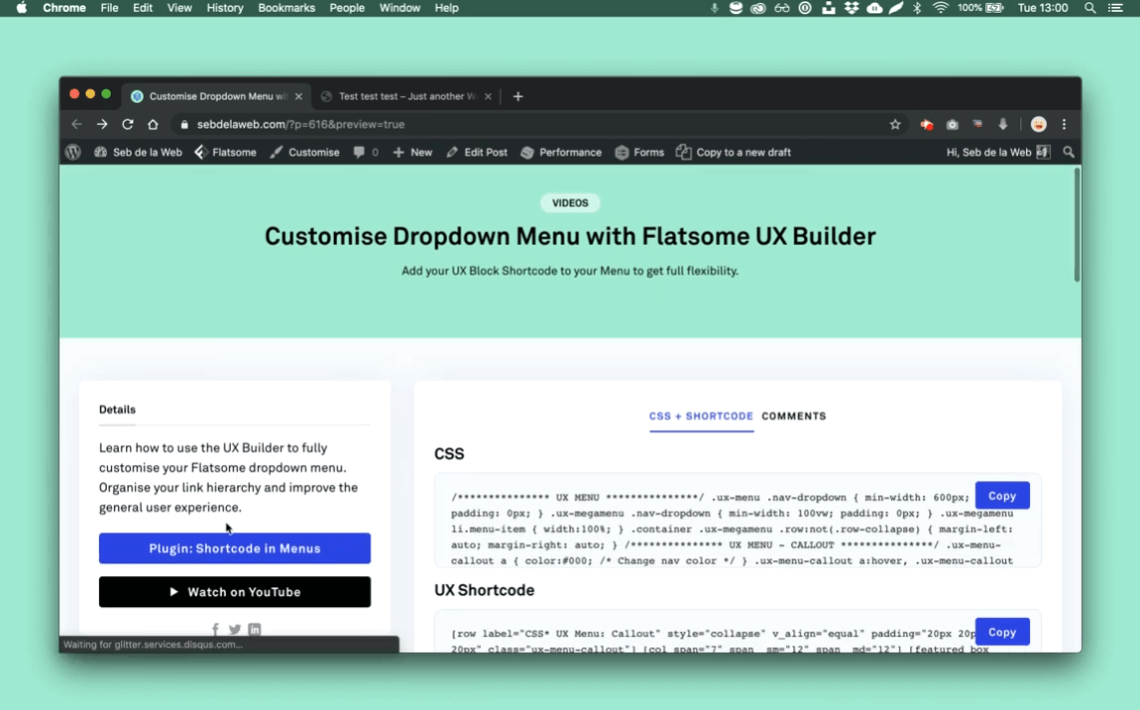
Đây là hướng dẫn trên trang sebdelaweb.com, có tiêu đề Custom Dropdown Menu with Flatsome UX Builder. Mình lưu lại để tiện sử dụng về sau. Nếu bạn đang cần và quan tâm có thể dùng thử cách tạo Mega Menu tuỳ chỉnh nhanh gọn trong hướng dẫn này.
Đây là Shortcode dán vào UX Block:
1 2 3 4 5 6 7 8 9 10 11 12 13 14 15 16 17 18 19 20 21 22 23 24 25 26 27 28 29 30 31 32 | [row label="CSS* UX Menu: Callout" style="collapse" v_align="equal" padding="20px 20px 20px 20px" class="ux-menu-callout"] [col span="7" span__sm="12" span__md="12"] [featured_box img="https://www.sebdelaweb.com/wp-content/uploads/bag.png" pos="left" margin="0px 0px 30px 0px" icon_border="4" icon_color="rgb(229, 206, 143)" link="/flatsome-assets/"] <h4>Shop now</h4> <p>Video tutorials & guides </p> [/featured_box] [featured_box img="https://www.sebdelaweb.com/wp-content/uploads/percentage.png" pos="left" margin="0px 0px 30px 0px" icon_border="4" icon_color="rgb(180, 105, 106)" link="/flatsome-custom-styling/"] <h4>We love Sale</h4> <p> Enjoy the latest deals</p> [/featured_box] [featured_box img="https://www.sebdelaweb.com/wp-content/uploads/fashion.png" pos="left" margin="0px 0px 20px 0px" icon_border="4" icon_color="rgb(34, 39, 74)" link="/sebs-showcase-with-flatsome-website-examples/"] <h4>Shop the look</h4> <p> Inspired by the latest trends</p> [/featured_box] [/col] [col span="5" span__sm="12" span__md="12" bg_color="rgb(250, 250, 250)"] [ux_sidebar] [/col] [/row] |
Đây là CSS dán vào style hoặc Custom CSS
1 2 3 4 5 6 7 8 9 10 11 12 13 14 15 16 17 18 19 20 21 22 23 24 25 26 27 28 29 30 31 32 33 34 35 36 37 38 39 40 41 42 43 44 45 46 47 48 49 50 51 52 53 54 55 56 57 58 59 60 61 62 63 64 65 66 67 68 69 70 71 72 73 | /*************** UX MENU ***************/ .ux-menu .nav-dropdown { min-width: 600px; padding: 0px; } .ux-megamenu .nav-dropdown { min-width: 100vw; padding: 0px; } .ux-megamenu li.menu-item { width:100%; } .container .ux-megamenu .row:not(.row-collapse) { margin-left: auto; margin-right: auto; } /*************** UX MENU - CALLOUT ***************/ .ux-menu-callout a { color:#000; /* Change nav color */ } .ux-menu-callout a:hover, .ux-menu-callout a:hover h4 { color:#000; /* Change nav hover color */ } .ux-menu-callout .icon-box .has-icon-bg .icon .icon-inner { background-color: currentColor; /* Auto fill background with icon color */ } .ux-menu-callout .nav-dropdown .menu-item-has-children>a { text-transform: none; /* Text transform parent links */ font-size: 100%; } .ux-menu-callout span.widget-title { text-transform: uppercase; font-size:80%; letter-spacing: .05em; opacity: 0.8; } .ux-menu-callout ul.menu>li ul { border-left: 0px; padding: 0px 0px 10px 10px; } .ux-menu-callout .icon-box-text { padding-top: 5px; } .ux-menu-callout h4 { margin-bottom: 0px; } .ux-menu-callout p { font-size:80%; } .ux-menu-callout .widget .is-divider { margin: 5px 0px; opacity: 0; } .ux-menu-callout .widget { margin-bottom: 0px; } |
Theo dõi video này để dễ hình dung hơn:
Nguồn bài viết thuộc về: https://www.sebdelaweb.com/custom-dropdown-menu-with-flatsome-ux-builder/
 Copyright protected by Digiprove © 2023
Chào ! Bạn thấy nội dung này thế nào?

![[Hướng dẫn] Thêm Custom Fields vào Simple Products cho WooCommerce](https://huanvm.com/wp-content/uploads/2022/08/huanvmdotcom-add-custom-field-for-woocommerce.png "[Hướng dẫn] Thêm Custom Fields vào Simple Products cho WooCommerce 5")
![[Thủ thuật] Ngăn WordPress scaled (thu nhỏ) kích thước hình ảnh](https://huanvm.com/wp-content/uploads/2022/07/huanvmdotcom-wordpress-tu-dong-thu-nho-hinh-anh-goc.jpg "[Thủ thuật] Ngăn WordPress scaled (thu nhỏ) kích thước hình ảnh 8")